0 5 10 15 20

The New Standard for
Stage Plotting.

Design audio, lighting, video, staging — all in one 3D workspace. Export a complete PDF rider in one click.

See how it works

Features

Built for the real world of live production.

Every tool forged from actual touring workflows — not guesswork.

🎛️

3D Visualization

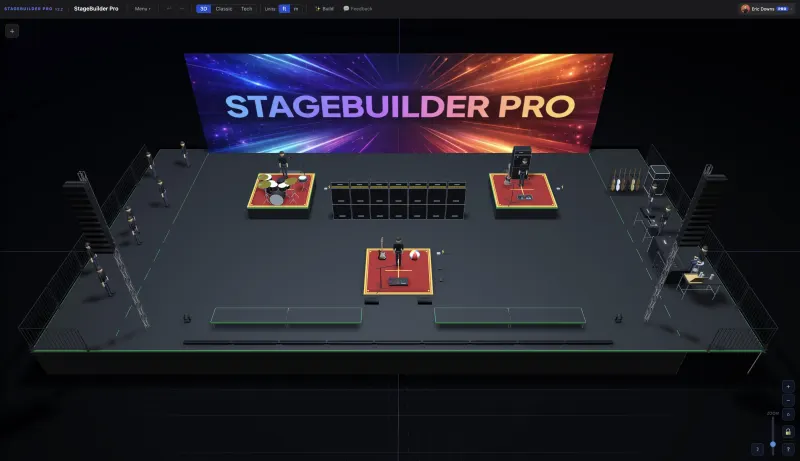
Real-time perspective and 2D plan view — switch angles instantly. See your rig from FOH, from the wings, or straight overhead. What you build is what the crew sees.

🏗️

5 Departments

200+ items across every production discipline.

Audio — consoles, PA, monitors
Lighting — moving heads, truss, LX
Video — LED walls, cams, village
Staging — decks, risers, drapes
Instruments — full backline library

AI Builder

Describe your rig in plain English. "2 line arrays each side, 4 subs ground stacked, FOH console 60ft out" — and it appears.

📄

Export Ready

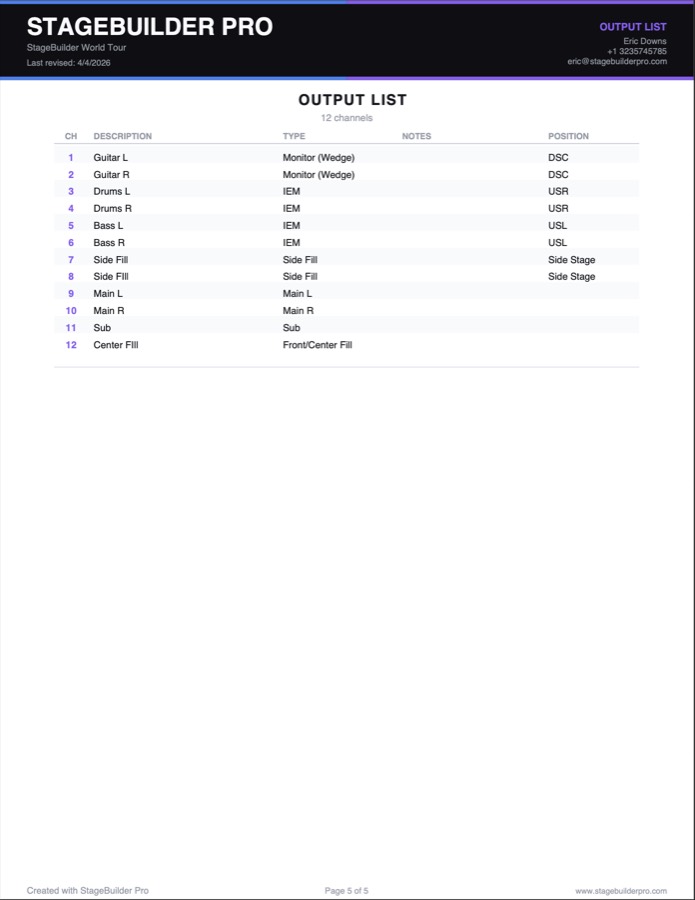
3D perspective, 2D printer-friendly overhead, and a full I/O list — all in one PDF. Everything your venue and crew need, one click.

🤝

Live Collaboration

Invite your crew and edit the same plot in real time. Share a view-only link with anyone — no account needed.

🎚️

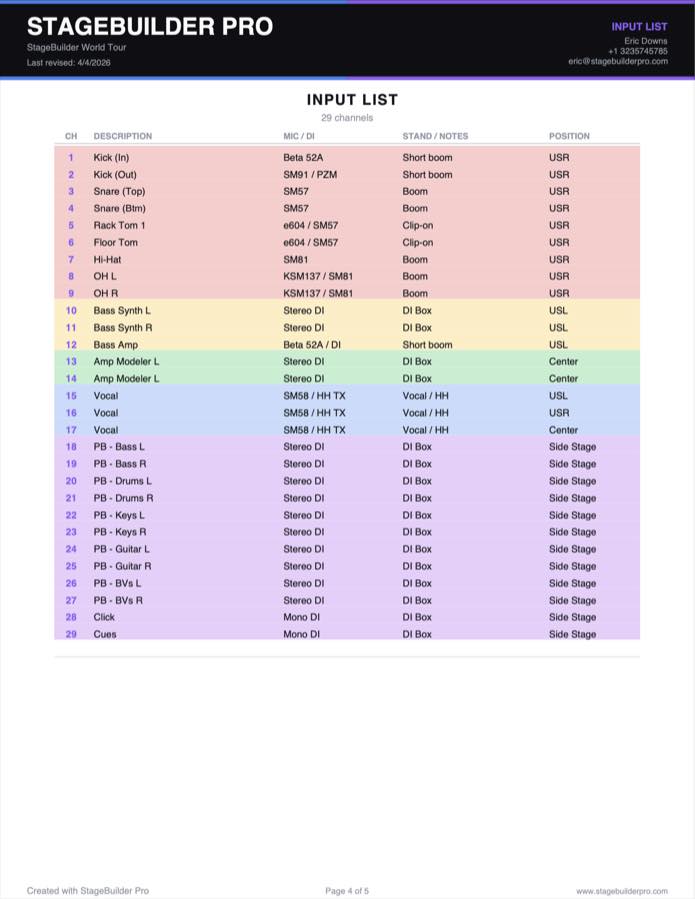
Input List

Every instrument auto-populates your I/O list with channel, mic type, and stand requirements. Edit inline, export with your plot.

👁️

Layer Controls

Toggle visibility per department. Clean up the view for audio-only, lighting-only, or any combination.

Riders that get read.

One PDF. Overhead, tech plot, 3D view, and full I/O list — the complete package your venue and crew will actually open.

PDF Overhead page
PDF Tech page
PDF 3D view page
PDF Input list page
PDF Output list page
1,800+
Industry Professionals
1,875+
Stages Plotted
215+
Production Items

What people are saying

How it works

From blank stage to finished rider.

Three steps. No tutorial needed.

01

Drag items onto the stage

200+ items across 5 departments, organized by category. Snap to grid, snap to truss edge, snap to deck surface — the rig builds itself.

02

Build your rig in 3D

Orbit the perspective camera. Toggle 2D plan view. Assign departments, colors, labels, and notes. Stack risers, hang motors, cascade truss.

03

Export your rider

3D perspective view, 2D printer-friendly overhead, and a full I/O list — all in one PDF. Everything the venue and crew need, one click.

Pricing

Simple, honest pricing.

Start building for free. Upgrade when you're ready.

Monthly Annual Save 17%
Free
$0
forever

  • 1 cloud-saved plot
  • Export PDF rider
  • Full 3D & 2D view

No credit card required

Elite
$10
per month

  • Everything in Pro
  • Live Collaboration
  • Global Venue Database
  • Priority support
Lifetime
$250
one-time payment

  • Everything in Elite
  • Pay once, own forever
  • Founding member badge
  • Priority support forever

FAQ

Common questions.

Everything you need to know before you build your first plot.

Is StageBuilder Pro really free?
Yes — you can sign up and start building for free, no credit card required. Free accounts include 1 cloud-saved plot, PDF export, and the full 3D & 2D view. Upgrade to Pro for unlimited cloud saves, the AI Stage Plot Builder, and more.
Do I need to create an account?
No. You can jump straight into the app and start building without signing up — your work is saved to your browser's local storage automatically. Creating a free account lets you sync your plots to the cloud and access them from any device.
What file formats can I export?
StageBuilder Pro exports a single PDF that includes a 3D perspective view, a 2D printer-friendly overhead, and a full I/O list with mic types, stand requirements, and channel assignments. Everything you need to send a complete rider, in one file.
How does the AI Stage Plot Builder work?
Type a plain-English description of your rig — "2 line arrays each side, 4 ground-stacked subs, FOH console at 60ft" — and StageBuilder Pro places the items automatically. It understands common production terminology, quantities, and stage positions (stage left, upstage center, FOH, etc.) and positions everything accordingly.
How is StageBuilder Pro different from other stage plot tools?
Most stage plot software is built around 2D diagrams — essentially icon-and-label drawing apps. StageBuilder Pro renders your entire rig in real-time 3D, so you can orbit around it, spot clashes before load-in, and see it from any angle. It ships with 100+ items across all five departments, AI-powered auto-placement, and exports a complete PDF rider — none of which exist in traditional flat plot tools.
Can I use StageBuilder Pro on mobile or tablet?
StageBuilder Pro is designed for desktop and laptop browsers where you have full mouse and keyboard control. It may load on a tablet, but the drag-and-drop workflow is optimized for pointer input. Mobile and touch support is on the roadmap.
How do I save and share my stage plot?
Your plot auto-saves to local storage as you work. Sign in (free) to save to the cloud. To share, export a PDF and send it directly — no account needed on the receiving end. Team collaboration and shareable plot links are planned for a future release.
Which browsers are supported?
StageBuilder Pro works best in Chromium-based browsers (Chrome, Edge, Arc, Brave) and Safari. Firefox is also supported. For the best 3D performance, use a desktop browser with hardware acceleration enabled.
Is StageBuilder Pro a stage plot pro tool?
Yes — StageBuilder Pro is a professional stage plot builder designed for touring and live production crews who need more than a basic diagram. As a stage plot pro tool, it gives you a real-time 3D view of your rig, a full production library (audio, lighting, video, staging, instruments), AI-powered placement, and export-ready PDFs — everything a working production professional expects from a stage plot pro workflow.

Ready to plot
your next show?

Free. In your browser. No install.